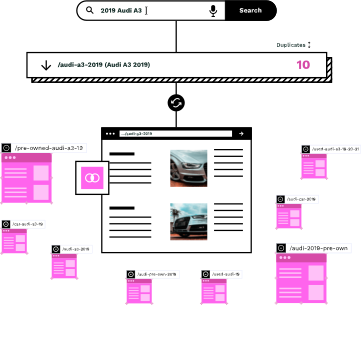
Product-topic mismatch is a ranking killer
When visitors land on a category page and the products don't match what they searched for, they bounce. Search engines notice. Your rankings drop. The problem is that these mismatches are hard to spot across thousands of pages.

Filtering rules fail silently
Most category pages are generated from filters on product attributes. When those attributes are missing, wrong, or inconsistent, the wrong products appear. You don't find out until rankings drop or customers complain.

Manual audits don't scale
A site with 50,000 category pages can't check each one manually. Teams spot-check a handful, maybe the ones with the most traffic. The long tail, where many problems live, goes unreviewed.

Search engines penalize irrelevance
Google and other search engines measure whether pages satisfy user intent. A page that promises “wireless headphones” but shows wired earbuds signals low quality. That signal affects your entire site, not just the one page.
AI-powered product-topic matching across your catalog
Similar AI analyzes every category page on your site and compares the page topic to the products actually shown. We use the same semantic understanding that powers our page creation to flag pages where products don't belong.
Understand the page topic
We analyze the page URL, title, H1, meta description and any category blurb to understand what topic the page is supposed to cover. This isn't keyword matching; it's semantic understanding of what products should appear.
Analyze every product listing
For each product shown on the page, we look at its attributes, title, description and images. We build a semantic profile of what each product actually is, independent of how it's been tagged in your catalog.
Score product-topic alignment
We compare each product's semantic profile to the page topic. Products that don't match get flagged with a relevance score. A page about 'oak dining tables' showing pine coffee tables will surface as a mismatch.
Surface pages that need attention
Pages with significant mismatch are surfaced in a prioritized list, ranked by the severity of the mismatch and the page's importance to your site. You fix the worst offenders first.
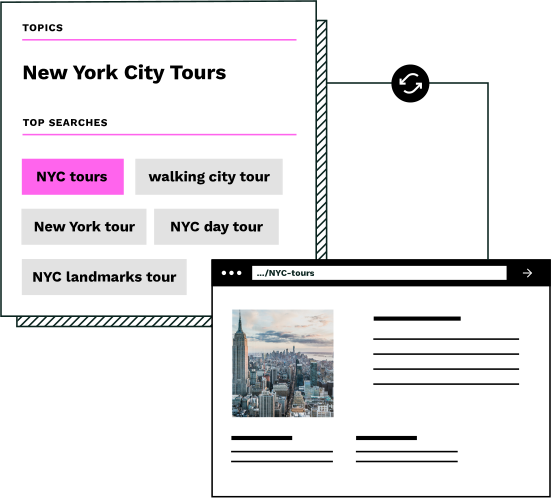
Common mismatches we detect
Product-topic mismatches come in many forms. Here are the patterns Similar AI catches most often.
Wrong color or material
A 'white cotton bedding' page showing beige linen sheets. The filtering rule missed the nuance, or the product data was incomplete. Users searching for white cotton find something else entirely.
Wrong product category
A 'garden furniture' page showing indoor side tables. Products were tagged broadly as 'furniture' and the filter didn't distinguish indoor from outdoor. Visitors looking to furnish their patio leave immediately.
Wrong price range
A 'luxury watches' page showing mid-range fashion watches under $100. The products don't match the premium positioning the page promises, creating a disconnect between expectation and reality.
Wrong brand or manufacturer
A 'Nike running shoes' page showing Adidas sneakers. Often happens when filters rely on inconsistent brand tagging or when third-party sellers use incorrect product data.
Manual spot-checks vs AI-powered detection
You can't manually review every category page. Similar AI checks them all and tells you which ones need attention.
Without Irrelevant Category Detection
- ×Mismatches only surface when customers complain or rankings drop
- ×Spot-check audits miss problems in the long tail of category pages
- ×Filter rules fail silently when product data is incomplete
- ×No systematic way to prioritize which pages need fixing
- ×Search engines see low-quality pages that hurt your whole site
With Similar AI's Detection
- Every category page is analyzed automatically on every crawl
- Semantic understanding catches mismatches that keyword rules miss
- Prioritized list shows you the worst offenders first
- Fix problems proactively, before rankings are affected
- Clean, relevant pages signal quality to search engines
Part of a complete site optimization toolkit
Irrelevant category detection works alongside Similar AI's other cleanup features. Cross-market cleanup finds category pages showing products from the wrong geographic market. Together, they ensure every category page shows the products visitors expect.
The same semantic intelligence powers our page creation feature. When we build new category pages, we use product-topic matching to ensure the right products appear from day one. Detection and creation work together: clean up what exists, create what's missing.
The result: a site where every category page delivers on its promise, and search engines reward you for it.
“Similar.ai let us clean up millions of duplicate pages without significant time investment. Many of them didn't answer the needs search users had.”
Jan-Willem Bobbink
SEO Specialist, Dutch Classifieds Site
Frequently asked questions
How is this different from checking my filter rules?
Filter rules check whether products have the right attributes tagged. Irrelevant category detection checks whether the products that actually appear match what the page promises, semantically. A product might pass all your filter rules and still be wrong for the page, for example if it's technically 'outdoor furniture' but really a plant pot stand that doesn't fit a 'garden seating' page.
What happens when you find a mismatch?
We surface the page in a prioritized list showing the page URL, the topic we detected, and the products that don't match. You can then investigate whether the problem is with the filter rules, the product data, or the page topic itself. We don't automatically remove products; you decide what action to take.
How do you determine what products 'should' appear on a page?
We analyze the page's URL structure, title, H1, meta description and any body content to understand the topic semantically. Then we compare each product's actual attributes, title and description to that topic. Products that are semantically distant from the page topic are flagged.
Can I adjust the sensitivity of the detection?
Yes. You can set a threshold for how strict the matching should be. Stricter settings will flag more mismatches, including borderline cases. Looser settings will only surface the most egregious problems. Most customers start strict and then adjust based on the volume of results.
Does this work for faceted navigation pages?
Yes. Faceted navigation often creates combinations that haven't been manually reviewed. A page for 'red dresses under $50 in size medium' might show products that are close but not exact matches. We detect these edge cases that are nearly impossible to audit manually.
How often should I run this detection?
We recommend running it on every crawl cycle, which you can schedule daily, weekly or monthly. Product catalogs change constantly, and new mismatches can appear whenever products are added or attributes are updated. Continuous monitoring catches problems before they affect rankings.
See which category pages need attention
Book a demo and we'll run an initial scan of your category pages. You'll see exactly which pages have product-topic mismatches and how severe they are. No commitment, real data from your site.